How to see time in a frozen frame
- #data-centric-ai
- #computer-vision
- #mlops
- #embedded-ai
At Secury360, the job sounded simple: detect intruders before they reached the building.
In reality, this meant running computer vision on low-power edge devices connected to up to eight cameras at once. The system had to detect people and cars, track them, understand whether they were moving towards the premises, and do all of that outside in the real world. Rain, darkness, bad camera angles, motion blur, parked cars, the usual computer-vision soup.
One problem kept annoying me: the system had to make decisions about movement from images where nothing was obviously moving.
Sometimes this was a car problem. The detector saw cars correctly, but at a low frame rate, in a busy parking lot, the tracker could swap identities between two stationary cars. Downstream, that looked like motion. A car that never moved suddenly became an event.
Sometimes it was a person problem. A pole, a trash can, or even a billboard with people printed on it could look enough like a person in a single frame to become suspicious. The missing piece was often not more object detection. It was context: did this thing move like a person, or was it just sitting there being visually annoying?
Events are not free. They go through the pipeline. Some get sent to the cloud model. They cost compute, they add noise, and if you do it often enough people stop trusting the system.
Or even the worst case, you miss a real trigger / alarm on the object that actually moved, because the tracker was busy chasing a false positive. This also becomes hard to really track in your metrics, because you are still detecting a lot of objects correctly. But you could be missing the one that matters.
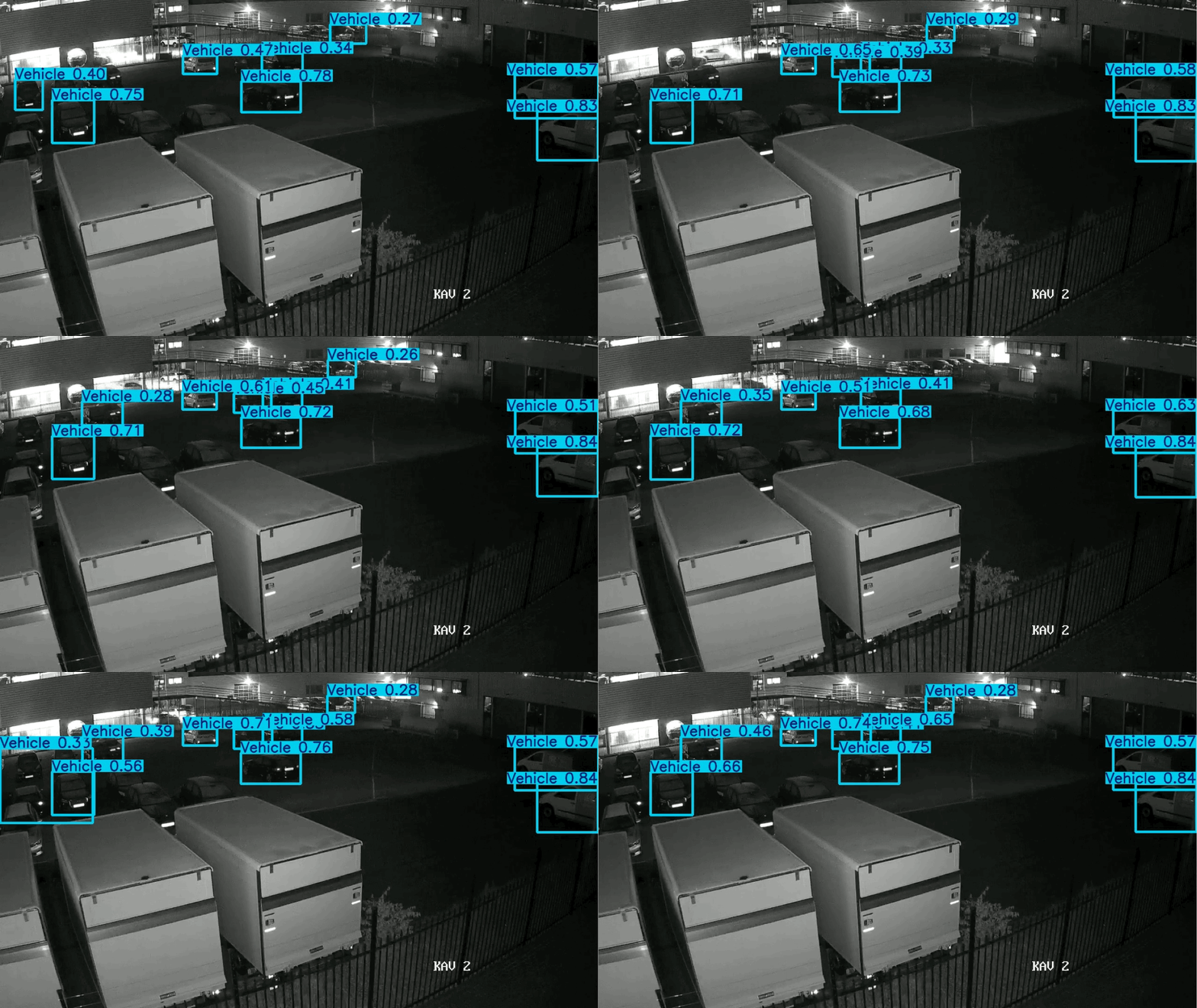 An example of the default yolvov8n model missing the moving care completly.
The thing I really wanted was an end-to-end temporal model.
Give the model a video window. Let it learn motion directly. Stop pretending a frozen frame can answer a question about movement. That would have been the clean version.
But the edge device did not care about the clean version. We had limited compute, multiple streams, and a model that had to stay small. A real temporal model was too heavy for the hardware budget.
So the question became: can we give a single-frame detector just enough time to make better decisions?
RGB is just a convention
An RGB image is three channels. We usually put red, green, and blue in them because that is useful for humans and for a lot of vision tasks.
But for this problem, color was not the most important signal.
I did not care whether a car was red or black. I cared whether it moved. I did not care what color shirt someone wore. I cared whether the blurry object in the distance was a person walking towards the camera, or a pole, a trash can, or a billboard with a person printed on it.
So I stopped using the channels for color.
Instead, I used them for time.
Take three sampled frames, convert them to grayscale, and stack them like this:
R = frame at T-2
G = frame at T-1
B = frame at T
The model still receives a normal three-channel image. Same input shape. Same kind of detector. Same deployment path.
But the meaning of the channels changed. They are no longer colors. They are moments.
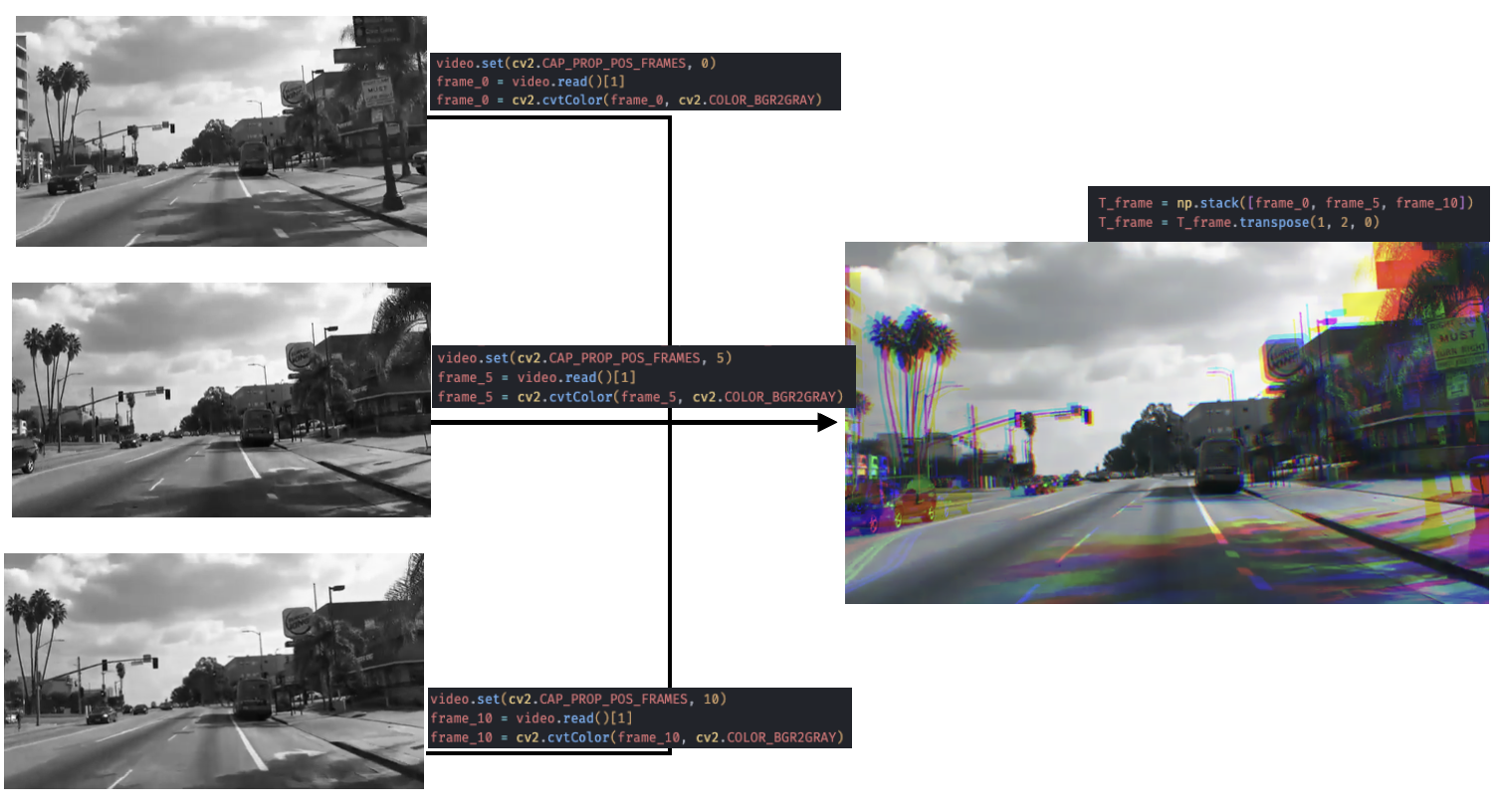 The tensor shape stays familiar. The information inside it changes.
This is the little trick that made it interesting. A stationary car looks almost identical in all three channels. A moving object leaves a shift. The model does not get full video understanding, but it gets a hint of time.
It is not elegant in the academic sense. It is a compromise. But it is the kind of compromise production edge AI is full of: take the hardware you actually have, keep the model small, and move the missing information somewhere cheaper.
The cheap part matters
The idea only works if creating the temporal image is cheap. If preprocessing becomes expensive, you just moved the problem.
For an RGB video file, the naive version is simple enough: convert each frame to grayscale, keep the last three sampled frames in a small buffer, and stack them into a three-channel image.
frames = deque(maxlen=3)

for frame in stream:
    frames.append(rgb_to_gray(frame))

    if len(frames) == 3:
        temporal = stack(frames, axis=0)
        run_detector(temporal)
That is already not bad. But live camera streams often give you an even nicer route.
Many RTSP streams arrive as YUV 4:2:0. In that format, the Y plane is luminance. In plain terms: the grayscale image is already there.
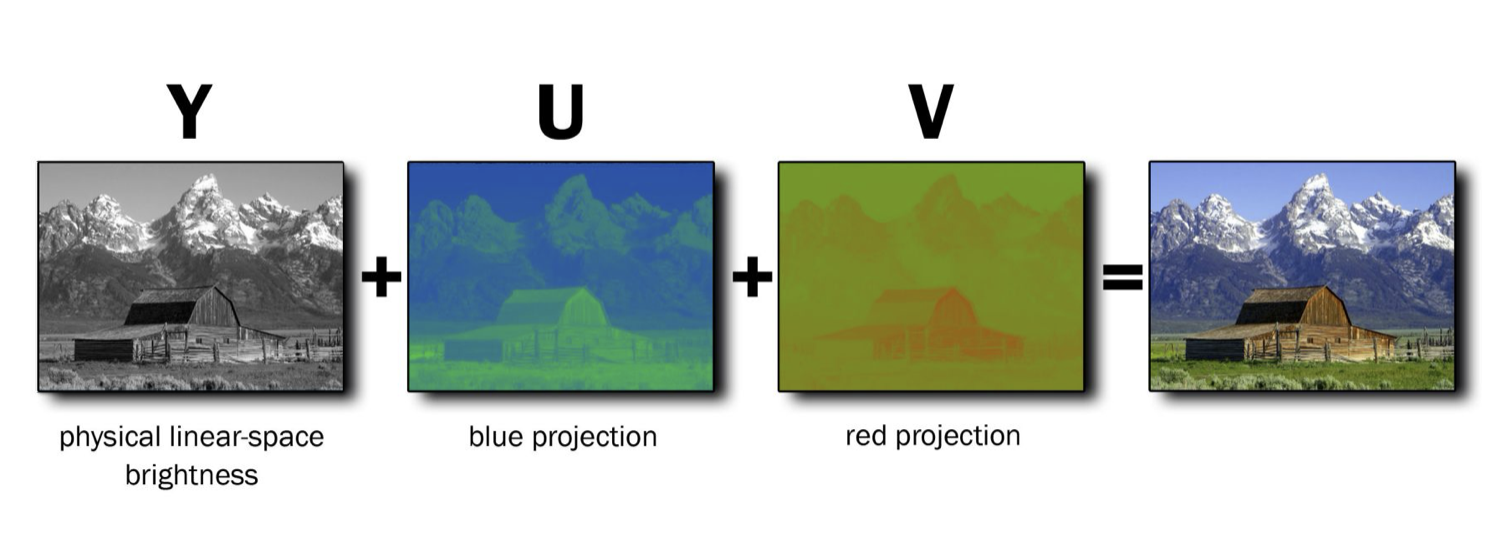
So instead of decoding to RGB and then converting back to grayscale, you can take the Y plane directly, sample it, and push it into the rolling buffer.
frames = deque(maxlen=3)

for packet in rtsp_stream:
    frames.append(sample(packet.y_plane))

    if len(frames) == 3:
        temporal = stack(frames, axis=0)
        run_detector(temporal)
That is the whole production trick: a tiny buffer, the luminance plane, and one stack operation.
No optical flow. No recurrent network. No extra service. No new hardware.
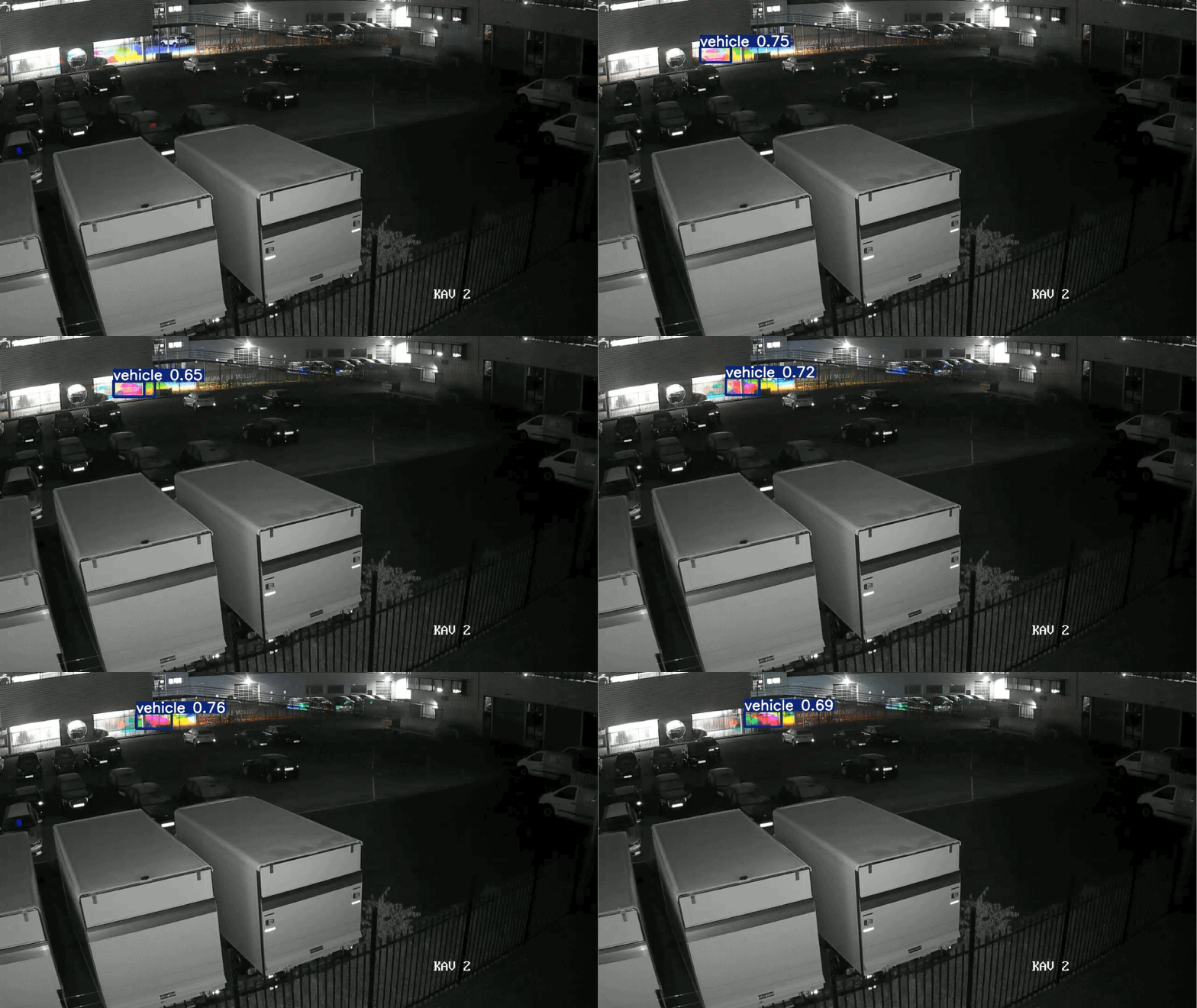 The same kind of scene, but the image now carries motion information, same model retrained with temporal data.
Reducing complexity
The best part was not just that the model got better signal. It was that one small change removed complexity from the rest of the pipeline.
Before this, the model had to care about every car in the frame. In a parking lot, that means annotating every parked car, training on every parked car, detecting every parked car, then asking the tracker and the rest of the system to figure out which ones matter.
That is a lot of work to say: most of these objects are irrelevant.
With the temporal frame, we could shift the target. We did not need to label every single car anymore. We could focus annotation on the moving objects, because motion was now visible in the input itself. Labeling became faster, cheaper, and less error-prone. There were fewer boxes to draw, fewer ambiguous parked cars to argue about, and fewer examples where the model was learning something we did not actually care about.
The tracker also became simpler. Instead of piling on guardrails to stop identity switches between stationary cars, we reduced the number of irrelevant detections reaching it in the first place. Less defensive logic. Fewer special cases. Less code whose only job was to compensate for a bad input representation.
It also helped runtime. Fewer detections means less work after the model. Non-max suppression has fewer boxes to compare. The tracker has fewer objects to maintain. The edge device spends less time reasoning about cars that were never part of the threat model.
That is what made the change feel bigger than the trick itself. It did not just improve the model input. It made the dataset simpler, the labeling cheaper, the tracker cleaner, and the device faster.
Why I still like this solution
What I like about this approach is that it does not pretend the model is magic.
The first instinct in ML is often to make the model bigger. Bigger backbone, more frames, more parameters, more compute. Sometimes that is the right answer. Here it was not available.
The useful answer was to change the representation. The model was not missing intelligence as much as it was missing evidence. It could not reason about motion because the input removed time before the model ever saw it.
By putting a short history into the channels, the detector got a cheap motion cue while staying deployable on the same edge device.
That is the part I find satisfying. Not because the trick is complicated. It is not. It is satisfying because it respects the constraint instead of wishing it away.
The model stayed small. The hardware stayed the same. The system got a better signal.
Sometimes that is the whole job.